
To manage the email notifications that you receive from the Sinch Build Dashboard, take the following steps:
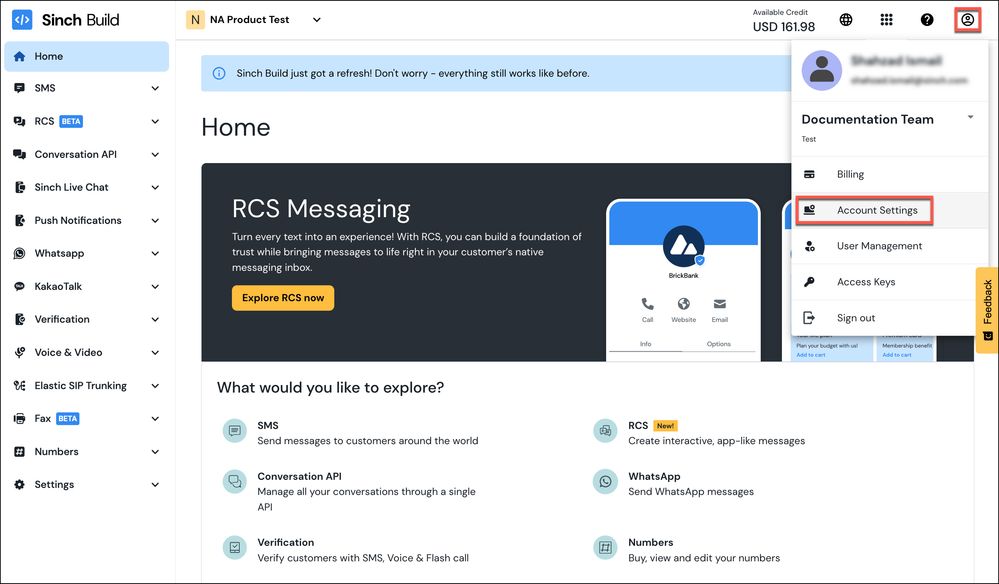
- Log in to the Sinch Build Dashboard and select your profile icon in the top right corner. Your profile menu is displayed:
Click the Account Settings option.
- The Account Settings page is displayed:
Select the Notifications options from the Account menu in the left panel.
The Notifications page is displayed:
This page allows you to add, remove and edit the users who receive e-mails for different updates from Sinch, including:
- Balances
- Invoices
- Pricing
- Reach changes
- Product related information
- Monthly Reporting.
- To add a new email address for notifications, click Add email. The Add email form is displayed:
Enter the email address where you want to receive notifications in the Email field and select the type of notification you want to subscribe to, from the Subscribe to section. Click Add email.


Comments
0 comments
Please sign in to leave a comment.