
To upload a list in Connect, take the following steps:
- Open Excel or an equivalent spreadsheet application.
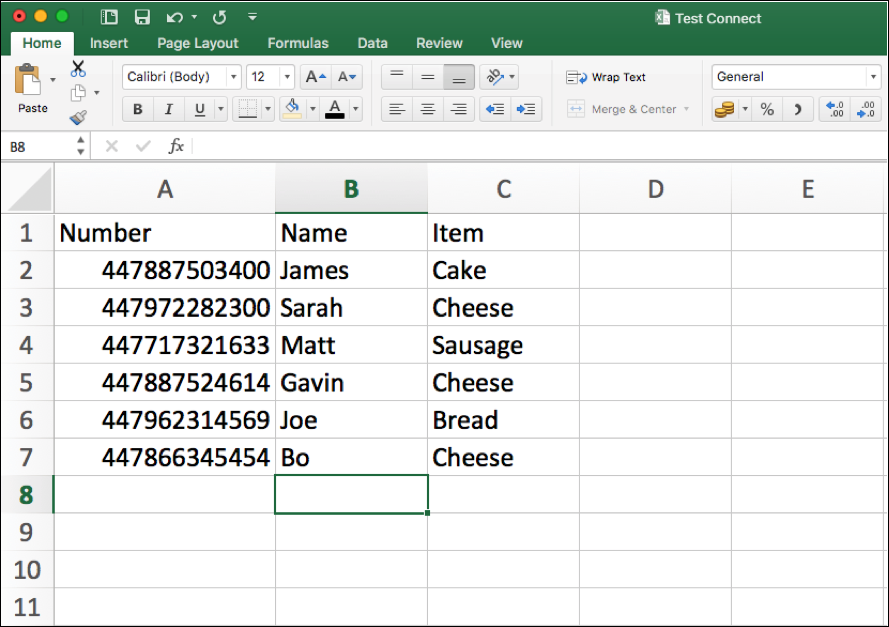
- Cell A1 must always read Number, if you are uploading further merge fields please provide headings for each column in cells B1 to T1, depending on how many you require.
- If you are uploading to an Address Book you must add Name in cell B1 alongside Number. This column must be populated.
- Input your data under the appropriate heading, numbers must be in International format without a + or leading zeros (447887123456).
- Ensure column A is formatted as Number and any decimal places are removed, if this column is formatted in any other way it will not upload (highlight the numbers > right click > format > numbers > ensuring decimal = 0).
- Save as a .CSV file, this can be done by using ‘Save As’ and selecting in the ‘.CSV’ file format.
Comments
0 comments
Please sign in to leave a comment.