
The Conversation API provides support for KakaoTalk channel. To start using KakaoTalk, you need to first have KakaoTalk Business Channel ID configured with KakaoTalk.
If you do not already have a existing KakaoTalk Channel, then follow the steps below:
The first step is to create a KakaoTalk Channel. Navigate to the Kakao for Business sign up page to register:
Note: You must have a personal KakaoTalk account before you can create a Channel.
Use your personal KakaoTalk account details to login to Kakao for Business.
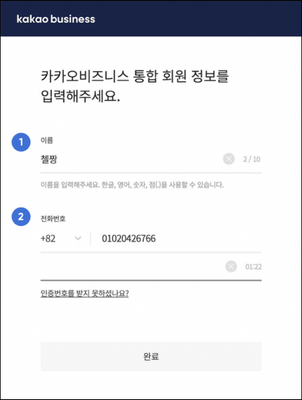
If you have not joined Kakao for business before, then you need to complete the conversion to a Kakao Business integrated member, to start using the KakaoTalk Channel
1- Name This will be the administrator of the KakaoTalk Business channel. The user/administrator should use their personal Kakao account to sign up. 2 - Mobile Phone Number It is mobile number of the administrator/user of the Kakao personal account Once you have logged in, select the Add New Channel option from the left panel:
1 - Channel Name The name displayed as a representative in the channel home, chat tab, and chat window. Please enter a name that matches your brand name as much as possible. Only Korean, English, numeric, and special characters (#!&?-_,.()) can be used. 2 - Search ID It is used as a search term to find my channel on KakaoTalk. Create a special ID that is easy to memorize and distinguishes you from other channels. 3 - Profile Picture Please register your profile picture according to the recommended size (640 x 640px) so that it can be displayed properly on KakaoTalk. 4 - Category
Choosing the right category can expose you to more users. Please select a category that best describes the channel's personality.5 - Preview Shows a preview of your new KakaoTalk channel. Once you have completed the form, click the Submit button (highlighted in red above). Your KakaoTalk channel is created.

To leverage the messaging capabilities of Sinch Conversation API with KakaoTalk, you need a KakaoTalk Business Channel.
Learn more
- Find out more about the Sinch KakaoTalk for Business channel.
- Sinch Developer Documentation site contains comprehensive documentation and tutorials, which show you how we support KakaoTalk using the Sinch Conversation API.
- Product Information.
Comments
0 comments
Please sign in to leave a comment.