
To create AlimTalk templates on the Sinch Dashboard follow the simple steps outlined below:
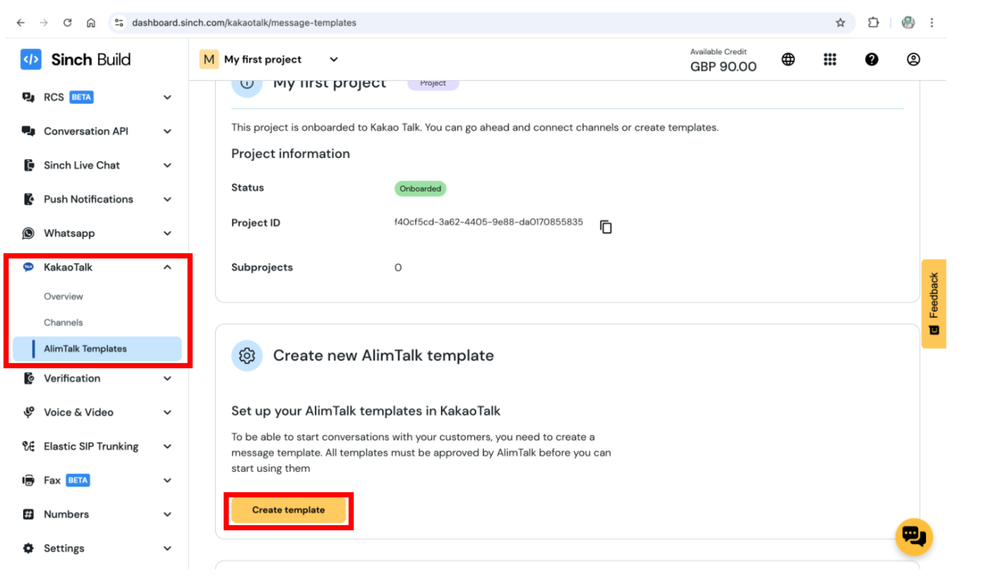
Go to Sinch Build Dashboard found ''Kakao Talk section'' and click on ''Alimtalk Templates'' section:
Click Create template.
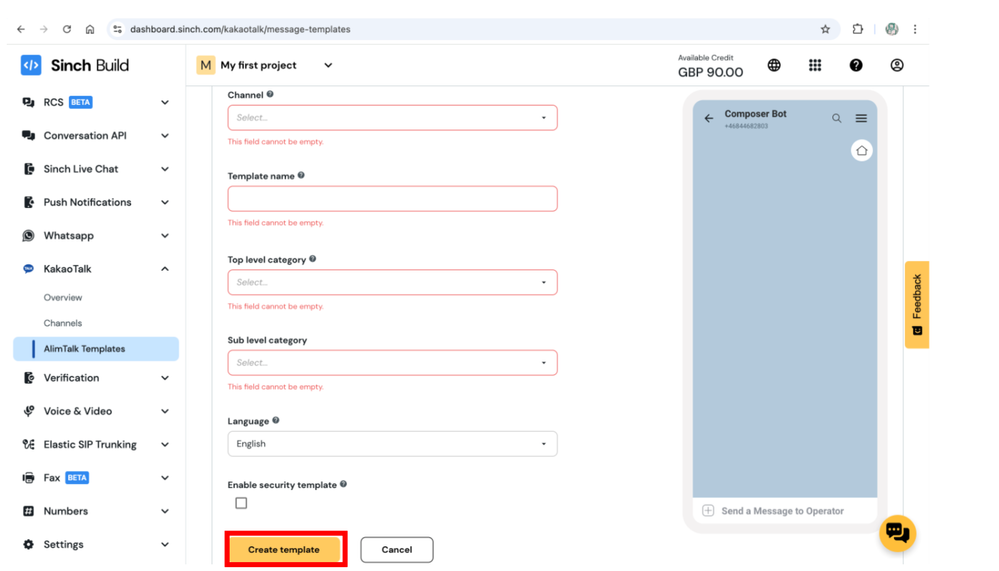
Fill all the required information, once completed click Create template.
Note: Please do not include any marketing/sales related content in the AlimTalk template. Alimtalk is only allowed for non-marketing information such as important notices, appointment reminders etc. For marketing purposes, please use FriendTalk messages.
- Once you have create the template, you may can find all your Alimtalk Templates in the Alimtalk Template section under Kakao Talk section.
Note: Alimtalk template may need up to 3 days for approval, this approval process is done by Kakao Talk not Sinch - you can go ahead and use the template once you see the template has been updated with the ''approved'' status in the status section.
Learn more
- Find out more about the Sinch KakaoTalk for Business channel.
- Sinch Developer Documentation site contains comprehensive documentation and tutorials, which show you how we support KakaoTalk using the Sinch Conversation API.
- Product Information.
Comments
0 comments
Please sign in to leave a comment.